ezClocker: Employee Time Track
ezNova Technologies DBA ezClockerBusiness
4.6336.00 Reviews
- Version
- 3.27.1
- Installs
- 100.00K
- Age Rating
- Everyone
Screenshots
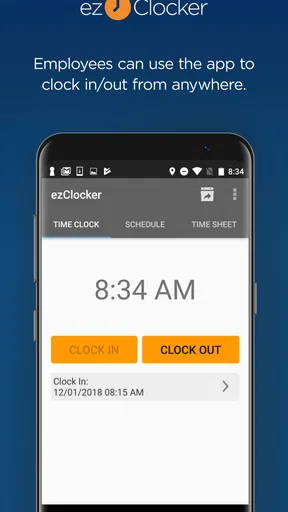
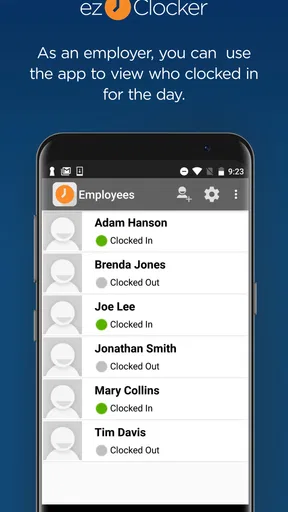
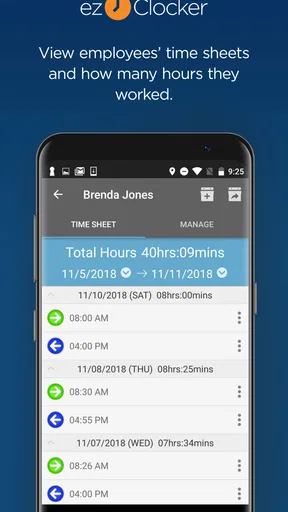
Our Review of ezClocker: Employee Time Track
 Analysis by Appyee
I pay particular attention to whether a workplace app stays understandable when someone is tired, hurried, or using a small screen between tasks. Time tracking is not just an administrative chore: a missed clock-in can turn into a payroll question, while an unclear schedule can leave an employee unsure where to be. ezClocker: Employee Time Track is aimed at making those everyday moments easier to manage, especially for small teams that need both time records and shift planning in one place.
Readable enough for quick workday checks
The app’s appeal is its straightforward focus. Rather than asking employees to learn a broad business suite, it centers on clocking time and checking shifts. In my view, that narrow scope can help people who only need to open an app, confirm what they are working, and get on with the job. Its clean, intuitive interface is a useful starting point for people who are not especially comfortable with workplace technology.
That simplicity matters most at the edges of a shift: before opening a shop, while preparing a job site, or when someone is checking a schedule after a change. A manager can use the schedule as a shared reference instead of relying on a chain of separate messages. Employees still need to pay attention to updates, but having the plan in the same tool as timekeeping can reduce the mental effort of switching between a spreadsheet, email, and a clock-in method.
There is a practical trade-off here. An app with a focused set of tasks may feel easier to approach than a full workforce-management platform, but it is not automatically the best fit for every business process. If your team needs a wide range of functions beyond time and shifts, you may prefer a larger system that brings those workflows together. I would judge ezClocker by whether its core routine matches your team, not by how many unrelated tools it tries to replace.
Different ways of using the same routine
For a manager, scheduling and GPS-verified clock-ins address two different questions: who is expected to work, and whether a mobile clock-in comes from the relevant location. That can be useful for a team that moves between work sites or has employees who do not report to one central desk. GPS verification can support clearer records, but it should be treated as a check within a timekeeping process, not as a substitute for a fair conversation when a record looks unusual.
For an employee, the useful habit is to check the shift before the workday rather than relying on memory. If a schedule changes, an alert can help bring that change to attention, but alerts are easiest to miss when a phone is muted, out of battery, or buried under other notifications. I would still encourage teams to agree on a backup way to communicate urgent changes instead of assuming every worker will see an app notification immediately.
Consider a small cleaning crew whose members start at different client locations. A supervisor can set out the shifts, while each worker uses a phone to record a start and finish at the appropriate place. Later, the manager can review time records and prepare payroll information. The useful detail is that the schedule and clock-in routine can be considered together: if a shift was changed, the manager can check the planned hours alongside the recorded time before resolving a discrepancy. That does not remove the need to verify unusual entries, but it gives the conversation a more concrete starting point.
Access in the middle of a shift
Phone-based clocking can be more practical than a shared punch clock for people who travel between locations, and it avoids asking every employee to find a manager just to record time. At the same time, it relies on having a charged, working phone and a usable connection at the moment someone needs to clock in. In a basement, rural work area, or building with poor reception, that reliance can become a real obstacle rather than a minor inconvenience.
This is where I would plan the process before asking a whole team to depend on the app. Have employees try the clock-in routine at their actual work locations, not only at home or in the office. Agree on what to do if a phone loses service, a device is unavailable, or someone forgets to record a punch. The app is most helpful when a manager has a calm correction process; it is less reassuring if a worker has no clear way to report a missed entry.
GPS also has a human side. Location checks may be useful for confirming a job-site clock-in, but employers should explain when that verification is relevant and how time records will be reviewed. Workers should not be left guessing whether a location mismatch means a mistake, a technical issue, or a policy concern. Clear expectations make the feature more useful and less likely to feel like surveillance for its own sake.
Who will get the most from it
I would consider this app for a small business with hourly staff, changing shifts, and work that happens away from one front desk. It can also suit an owner who currently gathers hours from texts or handwritten notes and wants a more organized routine. By contrast, a large operation with complex approval chains, specialized labor rules, or many connected business systems should compare it carefully with broader workforce software before moving everyone over.
It is also worth separating employee timekeeping from personal productivity tracking. Freelancers may find a shift-and-attendance tool useful when they manage hourly work for a team, but someone tracking billable project time across clients may need a product built around projects, tasks, and invoices instead. The right choice depends on whether the main question is “when did this person work?” or “how long did this project take?” Those sound similar, but they lead to different records and routines.
The Basics of ezClocker
First off, let me just say that the setup process is a breeze. Whether you're a small business owner or a freelancer, getting started with ezClocker: Employee Time Track is as simple as downloading the app and following a few straightforward steps. The user interface is clean and intuitive, which means even if tech isn't your thing, you'll find it easy to navigate.
Features That Stand Out
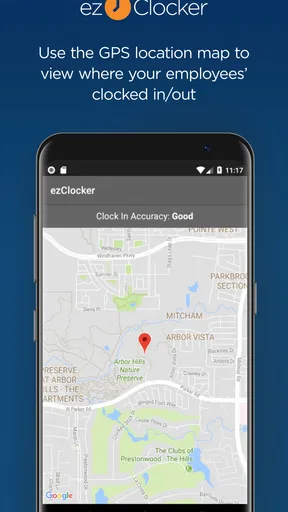
One of the standout features is the ability to track time with GPS verification. Yep, you read that right. This means employees can clock in from their mobile devices, and you can verify their location. It’s a game-changer for businesses with remote workers or multiple locations.
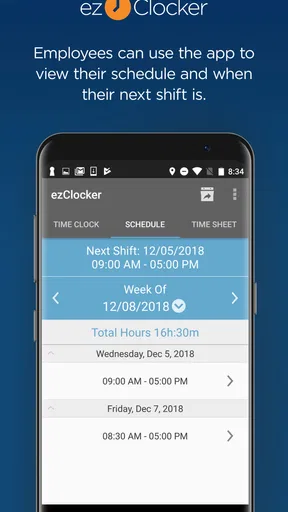
Additionally, the app allows managers to schedule shifts and alerts employees when their schedules are updated. No more messy spreadsheets or lost emails! Everything is neatly organized in the app, making it easy to plan your week.
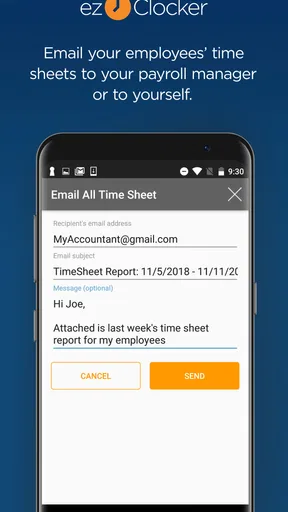
Another feature that caught my eye is the payroll export option. You can generate detailed reports and export them in formats that are compatible with major payroll software. This makes payday a lot less stressful, trust me.
User Experience
Using ezClocker feels almost like having a personal assistant. It's designed to save time and reduce hassle for both employers and employees. The real-time tracking means everyone stays accountable, and the app’s notifications ensure nothing slips through the cracks.
I also appreciate the app's flexibility. It doesn’t matter if you’re handling a team of five or fifty; it scales with your needs. Plus, the customer support is top-notch. I had a couple of questions, and their team was quick to respond and super helpful.
Room for Improvement?
While the app is fantastic, there’s always room for improvement. One thing I’d love to see is an offline mode. There are times when an internet connection isn’t available, and having the ability to clock in/out offline would be a bonus.
Also, while the GPS feature is great, it's worth noting that it can drain battery life quicker than usual. So, if you’re using it extensively, keep a charger handy.
Inclusive fit and practical limits
Readable design is only one part of accessibility. I would not assume that an employee with low vision, limited dexterity, or difficulty processing notifications will find every task equally easy just because the interface feels simple to me. Before adopting it, ask the people who will use it to try the actual clock-in and schedule-checking steps on their own devices. That small trial can reveal whether text, touch controls, or the pace of the workflow creates friction for someone on your team.
For workers with motor limitations, a time-sensitive tap can be stressful if they need more time to position a phone or navigate a screen. A manager can reduce the stakes by making missed punches easy to report and correct, rather than treating every late entry as intentional. For workers with sensory needs, notifications may be helpful reminders or an unwanted interruption; agree on a communication approach that works for the individual, and do not make a push alert the sole channel for a shift change that has serious consequences.
There is also a difference between being able to open an app and being able to use it reliably in a particular job. Gloves, bright sunlight, noise, a shared device, or a phone kept in a locker can all change how practical mobile timekeeping is. If those conditions describe the workplace, test the process during a normal shift and keep a clear alternative for recording time. A paper note or direct message to a supervisor may be less elegant, but a dependable backup is better than an employee being unable to report hours.
Choosing the right plan and workflow
People often ask whether this is free to use and whether every employee needs to pay separately. The app is free to download, with in-app purchases ranging from five to sixty dollars per item. Because a business’s needs and team setup differ, I would check the current purchase options inside the app and work out the total cost before asking employees to adopt it. The free download is a low-friction way to evaluate the workflow, but it should not be confused with a guarantee that every feature or team arrangement has no cost.
It is also sensible to test the payroll handoff before a busy pay period. Exporting a report can save retyping, but an export is still a point where a manager should check dates, hours, and exceptions against the intended payroll process. I would run a small trial, compare the result with the records your business already trusts, and only then make it the regular source for payroll preparation. That is a more useful test than simply confirming that a file can be produced.
If you are comparing it with a spreadsheet, the advantage is having shifts and time records in a purpose-built mobile workflow rather than maintaining several cells and messages by hand. A traditional punch clock may be more suitable when staff all pass through one fixed entrance or when phones are not appropriate at work. A broader workforce platform may be a better choice when scheduling is only one part of a complicated operation. ezClocker makes the most sense when its particular combination of hourly time tracking, shift planning, and location verification matches the way the team actually works.
What to check before relying on it
The app is rated for Everyone, has an average rating of 4.6 from around 6,300 ratings, and has been installed over 100,000 times. Those figures suggest that many people have tried it, but they cannot tell you whether it fits your workplace or whether every employee will find the same steps comfortable. It comes from ezNova Technologies DBA ezClocker, was released in 2013, and its current version is 3.23; I would still check that the device in use meets the stated minimum operating-system requirement of version 7.0 before setting up a team workflow.
One practical question is what happens when a worker forgets to clock out. Another is who reviews a location mismatch or corrects an inaccurate record. These are not minor edge cases: the answers determine whether time tracking feels like a shared administrative tool or a source of avoidable conflict. I would settle those responsibilities in advance, explain them in plain language, and make sure employees know whom to contact when something goes wrong.
For teams that rely on phones, battery planning matters too. The GPS-related battery concern is worth taking seriously on long shifts, especially if employees already use their devices for navigation or work communication. A charging routine or access to a charger can help, but the broader point is to avoid making a personal phone the only possible route to an accurate time record unless the team has agreed that this is workable.
Final Thoughts
All in all, ezClocker: Employee Time Track is a powerful tool for anyone looking to streamline their time-tracking process. It’s user-friendly, packed with features, and designed to make life easier for everyone involved. Whether you're managing a small team or juggling multiple projects, this app is worth checking out.
So, if you’re tired of the old punch-clock system or endless Excel sheets, give ezClocker a shot. It might just be the time-saving solution you’ve been looking for.
My inclusive verdict is positive, with an important condition: a convenient mobile workflow should make work records clearer for employees as well as managers. I would recommend trying it with a small group, including people who work at different locations or have different comfort levels with phones, before making it the only route for recording hours. If the core routine is easy for your team and you have a fair fallback for connection, battery, or access problems, it can be a sensible alternative to scattered spreadsheets and manual notes. If those conditions are not met, choosing a fixed clock or a more complete workforce system may be kinder and more reliable.
Verdict
Strengths of ezClocker: Employee Time Track
- Easy-to-use interface for quick adoption.
- GPS tracking ensures accurate location data.
- Supports multiple job sites seamlessly.
- Affordable pricing for small businesses.
- Cloud-based, no need for manual backups.
Limitations of ezClocker: Employee Time Track
- Limited integration with payroll systems.
- No offline mode for time tracking.
- Basic reporting features, lacks depth.
- No biometric authentication available.
- Lacks advanced scheduling tools.
Similar Picks in This Category
View All
LinkedIn: Community & Network
LinkedIn3.8

Zoom Workplace
zoom.com4.1

Microsoft Teams
Microsoft Corporation4.6

Meta Business Suite
Meta Platforms, Inc.4.6

Webex Meetings
Cisco Systems, Inc.4.5

TeamViewer Remote Control
TeamViewer4.4
Frequently Asked Questions
What is ezClocker: Employee Time Track and how does it work?
ezClocker is a time tracking app designed to simplify employee management for small businesses. It allows employees to clock in and out using their smartphones, and managers can monitor attendance, track hours, and generate payroll reports. The app also offers GPS verification to ensure employees are clocking in from the correct location.
Is ezClocker suitable for all types of businesses?
While ezClocker is primarily designed for small businesses, it can be useful for any organization that needs to track employee hours. Its user-friendly interface makes it ideal for industries such as retail, construction, and healthcare. However, larger enterprises might require more comprehensive solutions.
Does ezClocker offer any security features?
Yes, ezClocker ensures data security by using encryption to protect information. The app also includes GPS location tracking to verify where employees clock in and out, reducing the risk of time theft. Additionally, managers can control access to sensitive information through customizable permissions.
What are the system requirements for downloading ezClocker?
ezClocker is available for both Android and iOS devices. For Android, it requires version 5.0 and up, while iOS devices need to run iOS 11.0 or later. The app is compact and won't consume much storage space, making it accessible for most smartphones and tablets.
Are there any costs associated with using ezClocker?
ezClocker offers a free version with basic features, but businesses may need to subscribe to a paid plan for advanced functionalities, such as additional employee accounts and detailed reporting. Pricing is competitive and designed to be affordable for small businesses, with a monthly or annual subscription option available.
